Free offline password vault

A free offline password vault 
in a workspace you control

Store website logins, app credentials, bank cards, and other private records in the same local-first workspace as your notes. Password entries are included in the free plan.

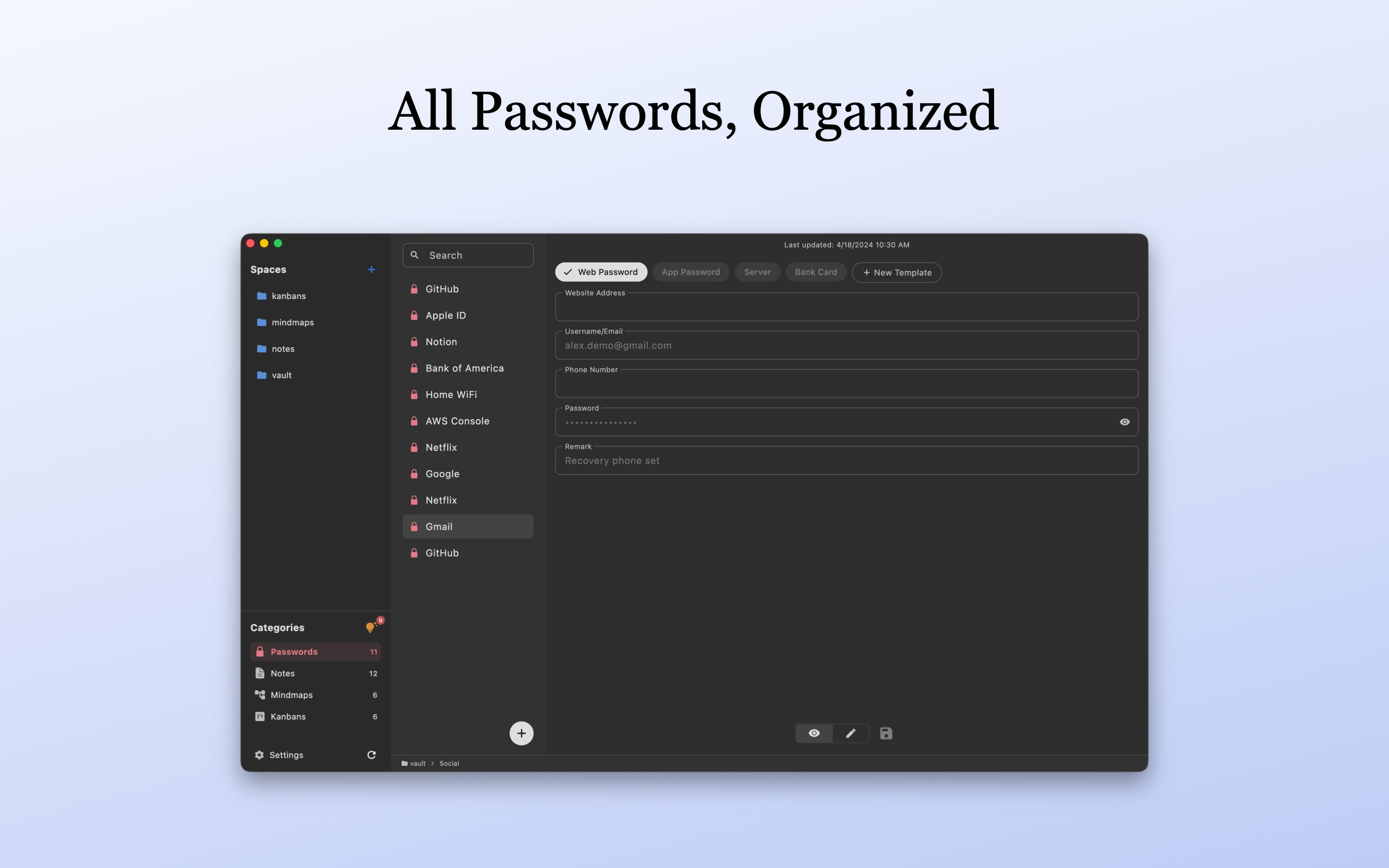
LocArk password vault on macOS showing example password records
Real LocArk interface with demonstration data. The sample records are not real credentials.

A personal password vault inside your private workspace

LocArk focuses on encrypted storage, organization, generation, copying, and portability rather than browser-first password automation.

Free password records

Create and edit website logins, app credentials, bank cards, and other structured private records without a Pro entitlement.

Password generation and quick copy

Generate passwords, copy individual values quickly, and let LocArk clear copied password data from the clipboard after the configured interval.

Auto-lock and local encryption

New workspaces use local encryption and a master password. Auto-lock helps reduce exposure when you step away from the device.

Same workspace across desktop and mobile

Use the same spaces, folders, categories, and password-record model on macOS, Windows, iPhone, iPad, and Android, with interactions adapted to each device.

Import, organize, and keep an exit path

Start with a small password set

Use non-critical sample entries first, then verify import, backup, export, and recovery before moving important credentials.

1. Create or open an encrypted workspace

Choose a storage location, set a strong master password, and confirm you understand how the workspace is backed up.

2. Add or import a small sample

Create entries manually or import supported 1Password CSV, Bitwarden CSV, or generic CSV data. Verify critical fields after import.

3. Organize and test daily access

Use spaces, folders, categories, templates, search, quick copy, and auto-lock in the workflow you expect to use.

4. Test backup and readable export

Keep a separate workspace backup and verify a readable ZIP export with non-sensitive sample data before depending on the workflow.

Use it for the right job

Offline vault storage, with explicit limits

LocArk can be a good fit for personal password storage when local control matters, but it is not currently a full browser-first password manager replacement.

Available today

  • Password and private-record entries in the free plan
  • Password generator, templates and custom fields
  • Quick copy, clipboard auto-clear and auto-lock
  • Local encryption in new workspaces
  • Supported 1Password, Bitwarden and generic CSV import
  • Readable export and user-managed backup

Not currently included

  • Browser extension or browser autofill
  • iOS Password AutoFill or Android Autofill Service
  • Built-in TOTP authenticator codes
  • Passkey storage or filling
  • Breach monitoring or password-health service
  • Enterprise administration, sharing policies, or managed team vaults

Offline password vault FAQ

The practical questions to check before moving important credentials.

Is password storage included in the free plan?

Yes. Password entries and the core password-record workflow are available in the free plan. The free plan supports up to two custom password templates; Pro removes that template-count limit.

Does LocArk work like 1Password or Bitwarden autofill?

Not currently. LocArk focuses on encrypted local storage, organization, generation, search, and copying. Browser/system autofill, TOTP, and Passkeys are not part of the current public capability.

Where are my password records stored?

They live inside the LocArk workspace location you choose. LocArk does not host your private workspace content or provide a hosted password-sync service. Read the local-vault password safety checklist for master passphrases, account MFA, and recovery planning.

Can I use the same workspace on another device?

LocArk has apps for macOS, Windows, iPhone, iPad, and Android and uses the same workspace structure across them. Cross-device access depends on a storage or sync location you choose and that your platforms support; LocArk does not provide hosted sync.

Can I import existing passwords?

LocArk supports 1Password CSV, Bitwarden CSV, and generic CSV password imports. Test a small export first and manually verify important records before relying on the imported data.

Try a free offline password vault

Install LocArk, create a non-sensitive test workspace, and verify your storage, backup, and export workflow before moving important credentials.